[HTML, CSS] 헷갈리는 개념 정리(1) +figure, figcaption
| inline | block | inline-block |
| a, span, input, label, i, em, strong |
h1~h6, div, form, table, p, ul, ol, dl, li, header, section, aside, article, footer nav, figure |
img, video |
블록 레벨과 인라인 레벨 요소의 그룹화
블록 요소는 인라인 요소 또는 블록 요소를 그룹으로 묶어줄 수 있고,
인라인 요소는 인라인 요소 외에 블록 요소는 그룹으로 묶어줄 수 없다.
블록 요소는 width, height, margin, padding값을 모두 줄 수 있지만
인라인 요소는 해당 태그의 컨텐츠 크기만큼만 공간을 차지하기 때문에 width, height 크기를 지정해도 무시된다.
margin, padding은 좌우 간격만 반영되고 상하 간격은 반영되지 않는다.
인라인블록요소는 인라인처럼 한 줄에 나란히 배치되지만, 블록처럼 w,h,m,p 모두 지정 가능하다.
목록태그 중 ol, ul 말고도 적절한 경우라면 dl도 써 볼 것
dl은 기호 없이 문단으로 목록을 만드는 방식(ex:스타벅스 홈페이지 mainmenu같은 경우에 적용하면 적절해 보인다.)
유용한 Emmet
<!--텍스트 입력하기-->
p{hello}
=> <p>hello</p>


<!--자동으로 숫자입력,할당하기-->
p.class${item$}*5
=> <p class="class1">item1</p>
   <p class="class2">item2</p>
   <p class="class3">item3</p>
   <p class="class4">item4</p>
   <p class="class5">item5</p>
figure, figcaption
: 사진에 캡션을 추가하는 태그. img>p태그를 사용하는 것보다 효율적이다.
사용예시1) 이미지와 캡션은 서로의 영역을 침범하지 않고 위아래로 차례대로 배치된다.
<!DOCTYPE html>
<html lang="en">

<head>
    <meta charset="UTF-8">
    <meta http-equiv="X-UA-Compatible" content="IE=edge">
    <meta name="viewport" content="width=device-width, initial-scale=1.0">
    <title>Animation</title>
</head>
    <style>
        figcaption{
            background: palevioletred;
            color: #fff;
            padding: 1em;
            text-align: center;
        }

        img{
            display: block;
        }
        body {
        display: flex;
        justify-content: center;
        align-items: center;
        }

        body, html {
        height: 100%;
        }

        * {
        box-sizing: border-box;
        }
    </style>
<body>
<figure>
    <img src="KakaoTalk_20221113_181659828.jpg" alt="">
    <figcaption>최애컬러로 무장하고 외출하는 나.jpg</figcaption>
</figure>
</body>

</html>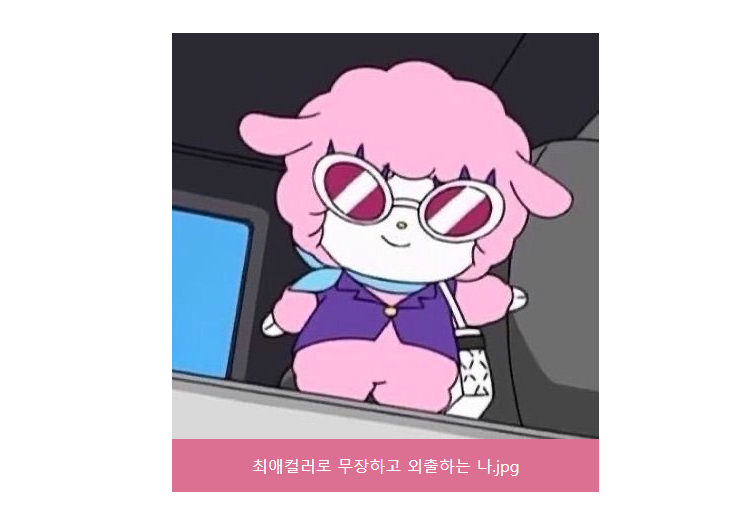
사용예시2) 이미지 내부 하단에 이미지의 일부로 자리잡게 만들기
<!DOCTYPE html>
<html lang="en">

<head>
    <meta charset="UTF-8">
    <meta http-equiv="X-UA-Compatible" content="IE=edge">
    <meta name="viewport" content="width=device-width, initial-scale=1.0">
    <title>Animation</title>
</head>
    <style>
        figure{
            position: relative;
        }
        figcaption{
            background: palevioletred;
            color: #fff;
            padding: 1em;
            text-align: center;
            position: absolute;
            left: 0; right: 0; bottom: 0;
        }

        img{
            display: block;
        }
        body {
        display: flex;
        justify-content: center;
        align-items: center;
        }

        body, html {
        height: 100%;
        }

        * {
        box-sizing: border-box;
        }
    </style>
<body>
<figure>
    <img src="KakaoTalk_20221113_181659828.jpg" alt="">
    <figcaption>최애컬러로 무장하고 외출하는 나.jpg</figcaption>
</figure>
</body>

</html>
시멘틱 태그(의미있는 태그)
<header>
: 헤더 영역을 정의. 기본적으로 헤딩 태그(h1~h6)을 사용하고 로고 또는 아이콘이 삽입된다.
<nav>
: 목록 혹은 목차 영역을 정의. 각 페이지로 이동할 수 있는 링크가 삽입되는 영역. 보통 헤드에 위치한다.
<main>
: 홈페이지의 주요 콘텐츠가 들어가는 부분을 정의. 기본적으로 section, article태그가 안에 들어간다.
<section>
: 특정 콘텐츠를 묶는 영역을 정의. 챕터별로 section 태그를 사용한다.
<article>
: 단독 콘텐츠 영역. 블로그로 따지면 콘텐츠 하나 또는 기사에서 기사 하나를 묶어줄 때 사용.
자체만으로 독립된 페이지에서 보여졌을 때 문제가 없을 때 사용한다고 보면 된다. section이 더 큰 요소이다.
<figure>
: 멀티미디어 영역. main안에서도 페이지의 콘텐츠들과 직접적인 상관이 없는 내용을 넣는다.
(ex: 광고, 다른 링크 등..)
시멘틱 의미 없는 글자태그: <b>, <i>,
시멘틱 의미 있는 글자태그: <strong>, <em>
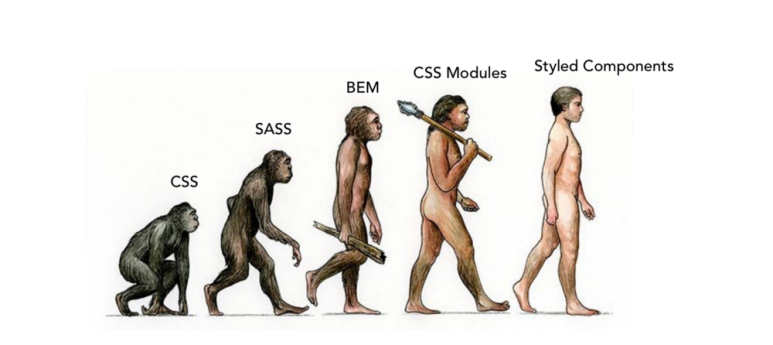
CSS 트렌드
[CSS 단위]
em : 해당 단위가 쓰여진 곳(body)의 폰트사이즈의 배수.
rem : 문서의 기본폰트값인 16px의 배수.
px 기반으로 구현된 웹사이트는 상황에 따라 전체적으로 웹사이트의 크기를 확대 축소하기가 까다롭다.
하지만 em, rem 단위로 작성했다면 기준이 되는 요소의 크기만 조절하면 전체적으로 확대 축소하기가 용이하다.
px 기반으로 되어 있는 디자인을 참조하여 em, rem 단위로 변환할 때 유용한 사이트
PXtoEM.com: PX to EM conversion made simple.
What is an EM? Wikipedia puts it well: "An em is a unit of measurement in the field of typography, equal to the size of the current font." If your font-size is at 16 pixels, then 1em = 16px For more information visit Wikipedia and Mozilla MDN. What is the
pxtoem.com